
I Built a Claude Code Mod So I Stop Scrolling Up for the Login Claude Gave Me
Claude Code's replies are hard to read in a narrow side panel, and the one line I need later is buried in them. margin is a free Claude Code mod that redraws replies answer first and keeps the values I choose one click away.
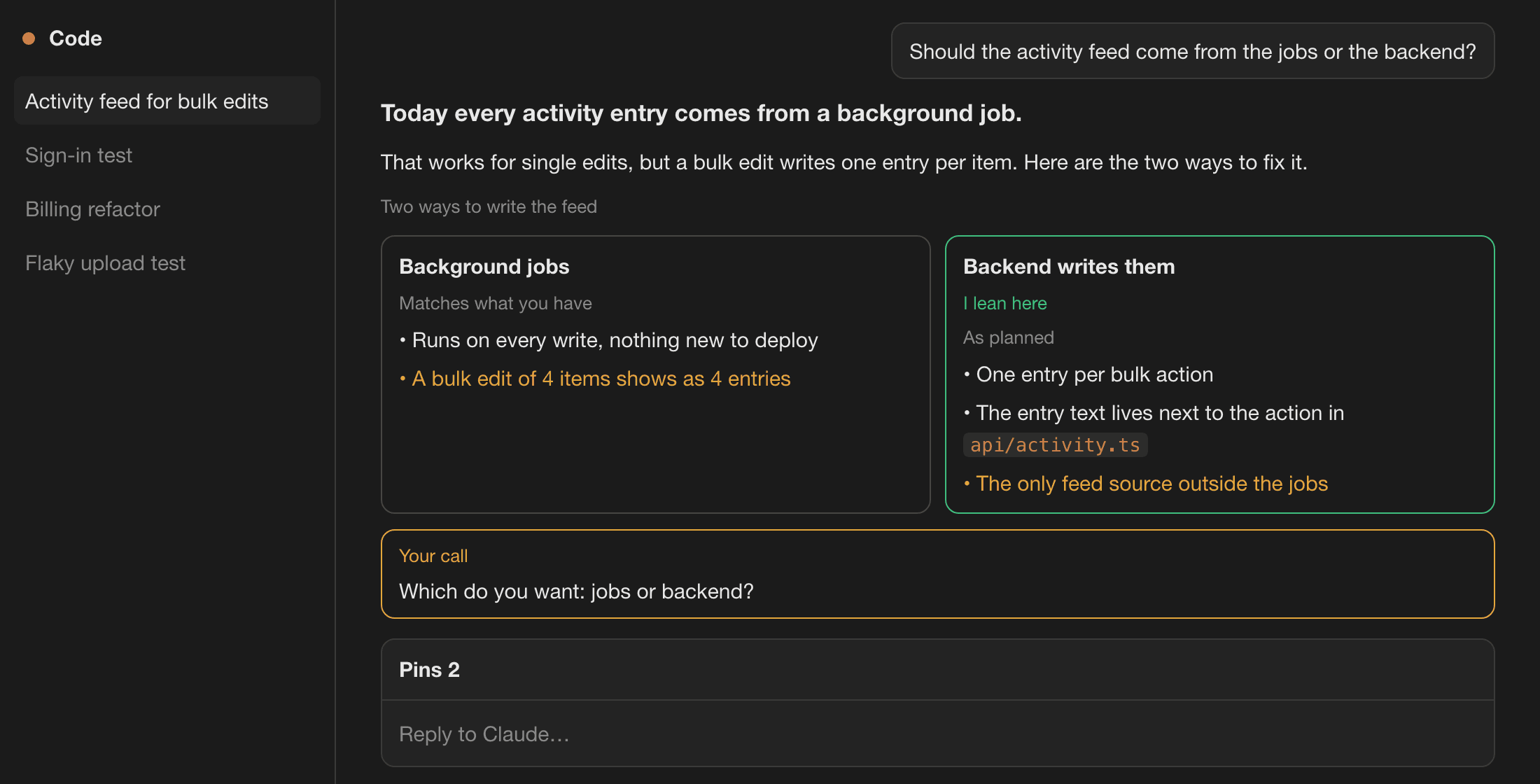
I run Claude Code in the VS Code side panel all day. When a task finishes, the reply is a wall of grey text in a column a third of the screen wide. The one thing I need from it later, the URL of the server it started, the test login, the command to run, sits in the middle of a paragraph.
Twenty minutes later I'm scrolling up through the whole chat to find it.
So I built a Claude Code mod that makes the reply easy to read, and keeps the line I need where I can find it.
Bookmarks get you back to the message
Claude Code already helps a little. The VS Code extension has bookmarks, and the Desktop app has Pin as chapter. Both mark a whole message so you can jump back to it.
That's useful, but it lands you on the same wall of text. You still read through the paragraph to dig out the URL. What I wanted was the value itself, ready to paste, and a reply I could read in the first place.
What margin does
margin is a free, open-source mod for Claude Code. Mods run inside Claude Code itself, so there's no account and no server. It does two things.
It redraws every reply for a narrow panel. The answer comes first, as one brighter line. Paragraphs are short, headings become small labels, and inline code becomes chips. When Claude offers choices, they become cards side by side, with its pick marked and the downsides in amber. When it needs a decision from you, the question sits in its own box at the end.
It keeps what's worth keeping. Claude marks the things you'll need later, like a local URL, a test login or a start command. They show up on a Keep card at the top of the reply, each with Copy and Pin. Pin saves it to a Pins tab that every chat in the project shares.
The Pins tab stays folded above the prompt until you open it. Each pin is a card with its own border color, which it keeps for good, and a small glyph for what it is: a link, a command, a login or a note. Type in the search box to search your pins and every message in the current chat. Anything that looks like a key shows as dots until you click Show.
You can also select any text in the chat and press Pin selection, or type /pin Label: value.
What I cut
The first version pinned everything Claude marked, for 24 hours, and opened the Pins tab on its own. Within a day the tab was full of things I'd never asked for. Now nothing is pinned unless you choose it, and pins stay until you remove them.
I also designed a Go to button that jumped from a pin back to its message. Then I noticed that bookmarks and Pin as chapter already do exactly that, natively. So I dropped it before writing it. margin does the two things they don't: readable replies, and the value itself.
What's not done yet
It's alpha. Everything is built and covered by 71 tests, but the hand check in VS Code and the Desktop app is still running. The images in this post are drawn from margin's own layout code, not screenshots.
Only one mod can draw a reply, so turn off other mods that redraw replies first, like cc-stretch. margin doesn't detect them for you.
To shape the replies, margin adds one short note to Claude's instructions, about 145 words per chat. /margin off removes the note and the drawing; your pins keep working.
What leaves your machine
Nothing. margin makes no network calls and never writes to your project. Your pins are stored per project folder in Claude Code's local mod store, and they never sync between computers.
Try it
You need Claude Code 2.1.309 or later, in VS Code, the Desktop app or the terminal. In Claude Code:
/plugin marketplace add isAlmogK/margin-claude-mod
/plugin install margin@margin
If it saves you a scroll, I'd like to hear about it, and if something looks off, open an issue on GitHub.
margin is the fourth of my tools for working with AI agents. trustbut proves a change is actually tested, Holdline proves it didn't break a business rule you approved, Apprentice makes sure you still understand it, and margin makes the conversation itself easier to read and come back to.
Building something with AI?
Fractional CTO, AI agents, or a rescue for an AI-built app.