
Why My AI Lead Generation Is a Pipeline, Not an Agent
People keep asking why I didn't just use an AI agent to find leads. The short answer is that I already know the steps. A fixed pipeline with one AI step is cheaper, steadier and much easier to debug.
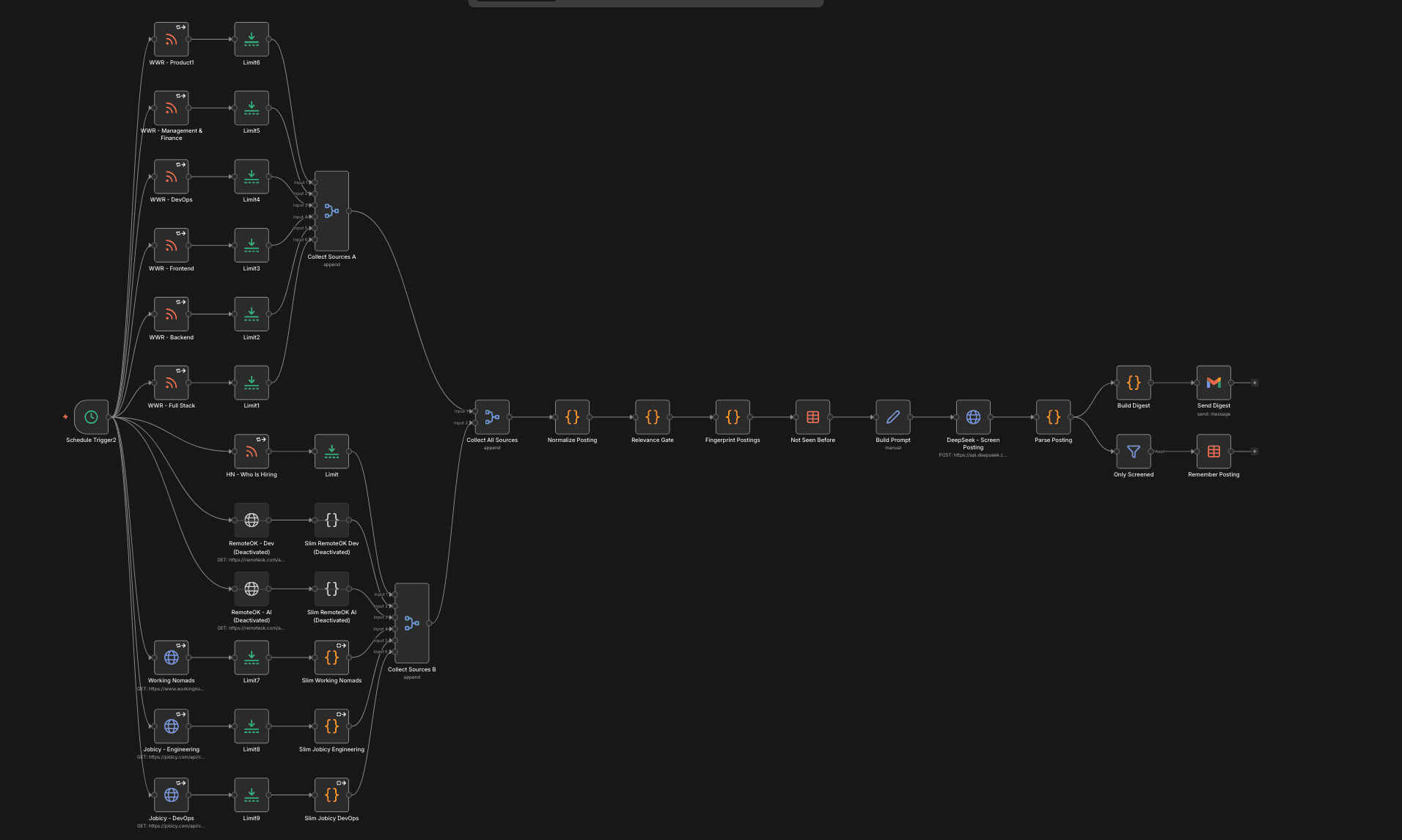
Every morning at 10:00 I get an email. It lists the fractional CTO roles, AI agent builds, AI app rescues and contract projects posted in the last 24 hours on Hacker News, Jobicy, X and the n8n community forum. Each one comes with the link to apply, a contact if there is one, the rate if they mention it, and a short summary of what they actually need.
When I show this to people, they almost always ask the same thing. Why not just give an AI agent a browser and tell it to go find me work?
My short answer is that I already know the way. The rest of this post is the long answer.
Where an agent fits, and where it doesn't
An agent picks its own steps. That's great when you don't know the way, like open research, a codebase you've never seen, or a messy task you'll only do once.
Screening leads isn't like that. The steps are the same every day. Get the feeds, drop the junk, remove duplicates, read what's left, send one email. If I gave that to an agent, I'd be paying it to work out the same route every morning, with no guarantee it takes the same route twice.
If you can draw the steps on a whiteboard, you don't need an agent to discover them.
That costs you in money, because an agent reads everything it finds. It costs you consistency, because the same input should give the same output. It costs you debugging time, because reading an agent's reasoning is much harder than opening a run and seeing which step dropped which item. And it costs you memory, because an agent forgets everything between runs unless you build memory for it. Once you're building that, you're building a pipeline anyway.
So the AI gets one job, the one that really needs judgement. It reads a posting and decides if it's a fit for me. Everything around it is ordinary code that does the same thing every time.
In 5 Things That Break AI Agents in Production I wrote that most agent projects fail because of the engineering around the model. This workflow is that idea taken to its end. Most of it is engineering, and very little of it is model.
1. Filter before the AI
A keyword check runs before anything reaches DeepSeek, so junk never costs me a token. The check is different for each source. Hacker News comments don't have a title (the RSS title is just the first line of the comment), and contract jobs on job boards are often called something like "Senior Backend Engineer" with the word contract hidden in the description. One filter on the title would miss both.
The cheapest token is the one you never send.
2. Same format for every source
RSS feeds, JSON APIs and X posts all look different. The first step turns each one into the same record with the source, title, company, link and plain text. After that, every step only has to deal with one shape of data, and adding a new source means writing one small mapping.
3. Recognise the job, not the post
The same gig often shows up on three boards and gets reposted twice. Each item gets a fingerprint made from the company name and the role, with the link as a backup. Duplicates become one item before the AI ever sees them.
4. Remember it only after it worked
A Data Table keeps track of every posting that has been screened. The important part is that a posting is only saved after DeepSeek has actually screened it. If the API times out, the posting isn't marked as seen, so it gets another try the next day instead of quietly disappearing.
A failed call should mean "try again tomorrow", not "gone forever".
5. Ask for JSON and expect it to break
The model runs at a low temperature, has to answer in JSON, and picks from a fixed list of categories (Fractional CTO, AI Agent Build, AI App Rescue, Project Dev Work, or not relevant). The code that reads the answer assumes it might be broken. If it is, that shows up as a row in the email instead of crashing the run.
6. Set the budget in code
X charges for every post you read, so the workflow runs four searches with at most 25 posts each. That's about $0.50 a day at most, and the limit lives in the workflow, not in a model's decision. For the big job boards I keep only the few fields I actually use before merging everything, which stops the run from running out of memory.
One more small thing. The email goes out every day, even when nothing relevant came in. An empty email tells me the workflow ran. No email at all would leave me wondering if it broke.
Where I would use an agent
I'm not against agents. I just think they belong at the edges of a system like this, not in the middle. Once the email has picked a lead worth chasing, an agent that researches that one company and drafts a note for me to review is a good use. The task is open, it's about one lead, and I approve the result before anything goes out.
My rule is simple. Use a pipeline when you know the steps, and an agent when you don't. Most business automation is the first kind.
The same pattern, a different market
None of this is specific to finding work. I use the same structure for K9 Signal Radar, which finds new working dog programs in the news, US procurement and EU tenders for DogBase and adds them to Apollo. The sources and the prompt are different, but the six ideas are the same.
Have a research job your team repeats every week?
It's probably a pipeline waiting to be built. I design and build these for teams, from a single workflow to a full system with AI in the right places.
Building something with AI?
Fractional CTO, AI agents, or a rescue for an AI-built app.